

Connecting AI workflows to Outlook and SharePoint through Microsoft Graph
Pipeline steps that read and write email, attachments and documents in Microsoft 365, acting with each user's own delegated access.
- Partner
- A multinational advisory firm
- Period
- October 2024 to January 2026
- Microsoft 365 steps
- 4
- Outlook reader and writer, SharePoint reader and writer
- Access
- Per user
- Delegated permissions from linked accounts
- Stored tokens
- Encrypted
- Key held in Azure Key Vault
The challenge
Much of the partner's working data lived in mailboxes and SharePoint sites. Pipelines that could not reach those systems left people copying files and emails in by hand.
What we built
Account linking that lets each user connect a Microsoft account with chosen permissions, and four pipeline steps that use Microsoft Graph to read and send email and to read and upload documents in SharePoint or OneDrive.
What was delivered
- Email and SharePoint available as sources and destinations in any pipeline
- Large attachments and files sent through Graph upload sessions
- Linked accounts scoped to a workspace, project or asset, with tokens encrypted at rest
Partner background
Our partner is a multinational advisory firm whose teams work with large volumes of documents, spreadsheets, databases and email. It wanted one internal platform where those teams could build data pipelines and AI agents themselves, instead of commissioning a new application for each need. The platform had to run inside the partner's Microsoft 365 and Azure environment, keep each team's work separate, and move work from experiment to production through controlled environments. This case study covers one part of that platform; nine case studies describe the whole.
The challenge
Data sits in Microsoft 365
Reports, requests and source files arrived by email or were stored in SharePoint. Automation that stopped at the edge of those systems still required manual work.
Acting as the user
Sending email or writing to a site must happen with the right person's permissions, not a broad shared credential.
Credentials at rest
Delegated access means storing refresh tokens, which are as sensitive as a password.
Attachments are large
A single Graph request limits attachment size. Real reports and exports exceed that limit and need a different upload method.
Objectives
- Read email, attachments and documents into pipelines
- Send email and upload files as pipeline outputs
- Act with each user's delegated permissions
- Store linked account tokens encrypted
- Handle attachments and files of realistic size
- Make failures clear when access expires or is removed
Our role
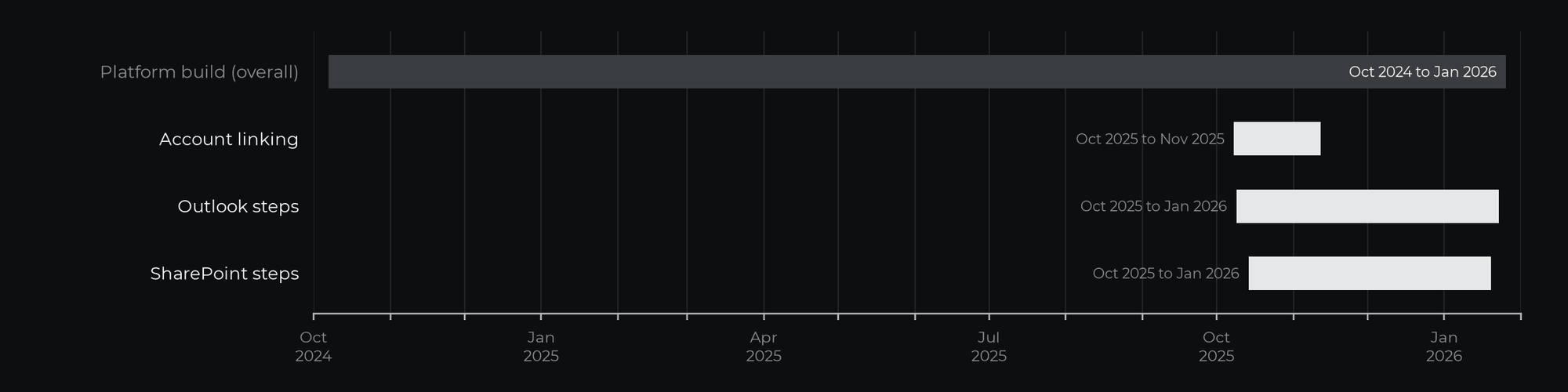
CharCentric provided technical leadership and architecture within a multidisciplinary engineering team, and contributed directly to implementation. The platform was built over 16 months, from October 2024 to January 2026, as a Python and FastAPI backend on Azure.
Scope and timeline
Account linking was built in October and November 2025. The Outlook and SharePoint steps were built between October 2025 and January 2026.
Approach
Link once, use everywhere
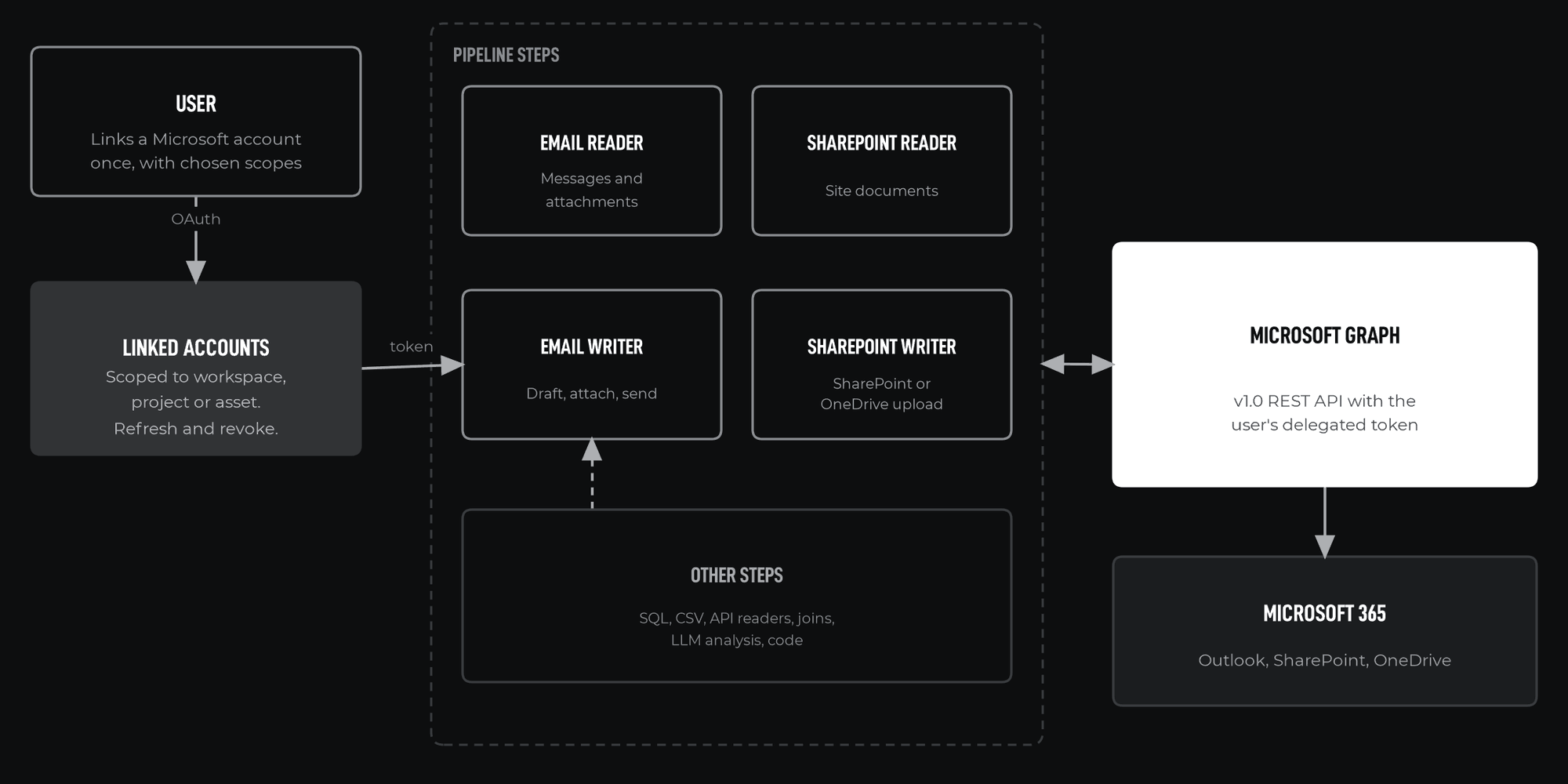
Users link a Microsoft account through Microsoft Entra ID OAuth, using MSAL, with chosen scopes. The linked account is attached to a workspace, project or asset, so pipelines in that scope can use it without handling credentials directly. Only the account owner, or users the owner allows, can run pipelines that use a linked account, and every action is taken as that owner.
Microsoft Graph as the single interface
All four steps call Microsoft Graph v1.0. One API covers Outlook, SharePoint and OneDrive, which keeps authentication and error handling consistent.
Follow the platform's limits
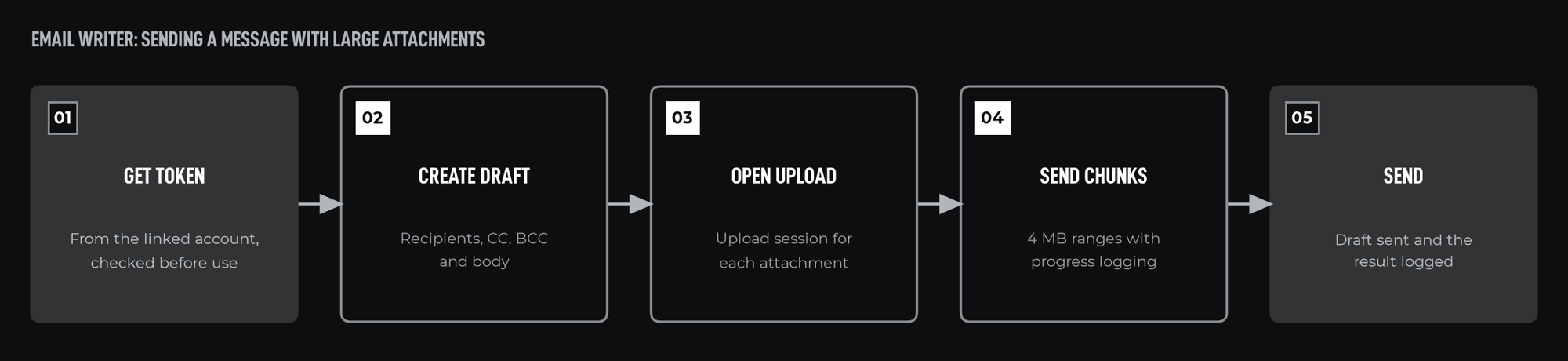
Outlook attachments over 3 MB go through an upload session in ranges under 4 MB, the most Graph accepts per request for attachments. Large SharePoint and OneDrive files use drive item upload sessions in chunks that are multiples of 320 KiB, as Graph requires.
Implementation
Account management
Endpoints start and complete the OAuth flow, list linked accounts, refresh tokens and remove access. Each account's MSAL token cache, which holds its refresh token, is encrypted with a key held in Azure Key Vault. Each step checks that a usable token exists before it starts and asks the user to relink the account if it does not.
Email reader
Retrieves messages with sender, recipients, received time and attachments, and returns them as structured data for downstream steps.
Email writer
Creates a draft with recipients, CC, BCC and body, opens an upload session for each attachment over 3 MB, uploads it in ranges under 4 MB with progress logging, then sends the draft.
SharePoint steps
Resolve a site from its host name and site path, then read documents or upload files to SharePoint or the user's OneDrive, using upload sessions for large files.
Tools and technologies
| Tool | Purpose |
|---|---|
| Microsoft Graph v1.0 | Outlook, SharePoint and OneDrive access |
| Microsoft Entra ID and MSAL | OAuth and delegated permissions |
| Azure Key Vault | Encryption key for stored tokens |
| aiohttp | Asynchronous API calls |
| FastAPI | Account management endpoints |
| PostgreSQL | Linked account records |
What was delivered
- Pipeline steps
- 4
- Delegated access
- Per user
- Linking scopes
- 3
- Stored tokens
- Encrypted
- Two Outlook steps and two SharePoint steps in the pipeline library
- Per-user delegated access through linked Microsoft accounts
- Upload sessions for large attachments and files, with progress logged
- Encrypted token storage, and clear errors when access is missing or expired
Why it matters
Automation earns its keep when it reaches the systems people already use. Integrating with Microsoft 365 under each user's own permissions extends pipelines into everyday work without weakening access control.
If your organization is planning a platform of this kind, or needs a specific part of one designed and delivered, we would be glad to discuss it.