

Live run monitoring and cancellation across server instances
Step-by-step run logs streamed to the browser as they are written, and cancellation that reaches whichever server is running the pipeline.
- Partner
- A multinational advisory firm
- Period
- October 2024 to January 2026
- Live streams
- 2
- Whole run, and each step's input or output
- Instance
- Any
- Cancellation reaches the server running the work
- Replay
- In order
- Sequence numbers prevent gaps and duplicates
The challenge
Pipelines can run for minutes. Users needed to watch progress step by step and stop a run that was going wrong, even though the platform runs on several server instances.
What we built
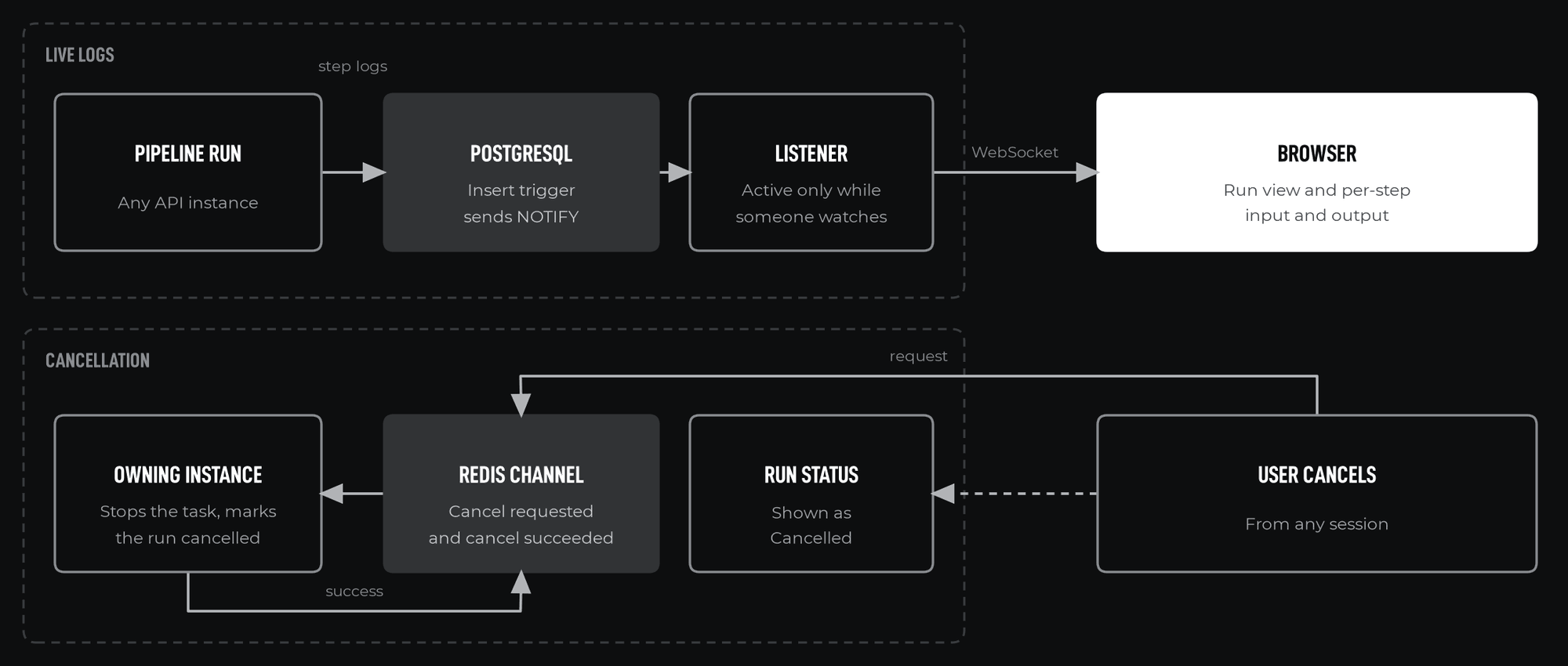
A database trigger that announces each new log entry by its id, a listener that forwards entries to browsers over WebSockets in sequence order, and a Redis channel that carries cancellation requests to the instance that owns the run, which confirms them.
What was delivered
- Live run and per-step views over WebSockets
- Earlier entries replayed when a viewer connects, with no gaps or duplicates
- Cancellation across instances, confirmed and recorded as a Cancelled status
Partner background
Our partner is a multinational advisory firm whose teams work with large volumes of documents, spreadsheets, databases and email. It wanted one internal platform where those teams could build data pipelines and AI agents themselves, instead of commissioning a new application for each need. The platform had to run inside the partner's Microsoft 365 and Azure environment, keep each team's work separate, and move work from experiment to production through controlled environments. This case study covers one part of that platform; nine case studies describe the whole.
The challenge
Waiting without feedback
Without live progress, users refreshed pages or started duplicate runs to check whether a pipeline was still working.
More than one server
The request to view or cancel a run can arrive at a different instance from the one executing it.
Joining mid-run
A viewer who connects during a run needs the earlier entries and the live ones, with nothing lost or shown twice where the two meet.
Large outputs
A step's output can be too large to send as a single message.
Instances fail
A run whose instance stops must not stay Running forever.
Objectives
- Show each step's progress as it happens
- Let viewers who join late see what already happened, in order
- Cancel a run from any session, whichever instance runs it
- Deliver large step outputs safely to the browser
- Mark runs left behind by a failed instance
Our role
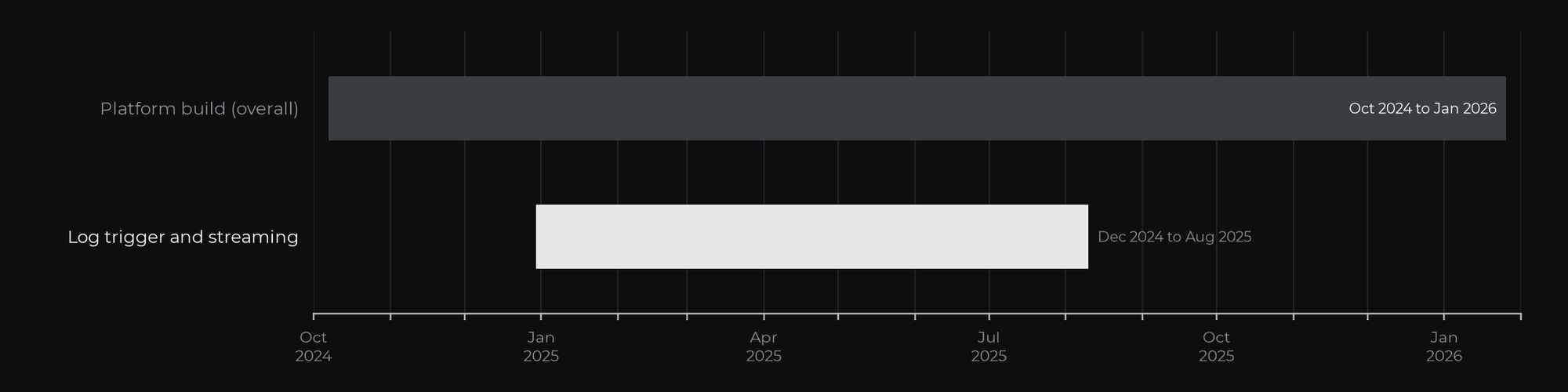
CharCentric provided technical leadership and architecture within a multidisciplinary engineering team, and contributed directly to implementation. The platform was built over 16 months, from October 2024 to January 2026, as a Python and FastAPI backend on Azure.
Scope and timeline
The log trigger, streaming endpoints and cancellation were built between December 2024 and August 2025.
Approach
Let the database announce changes
A PostgreSQL trigger on the run log table sends a NOTIFY message with the new entry's id. Any instance can listen and read the entry by id, which keeps messages far below PostgreSQL's 8,000-byte payload limit.
Number every entry
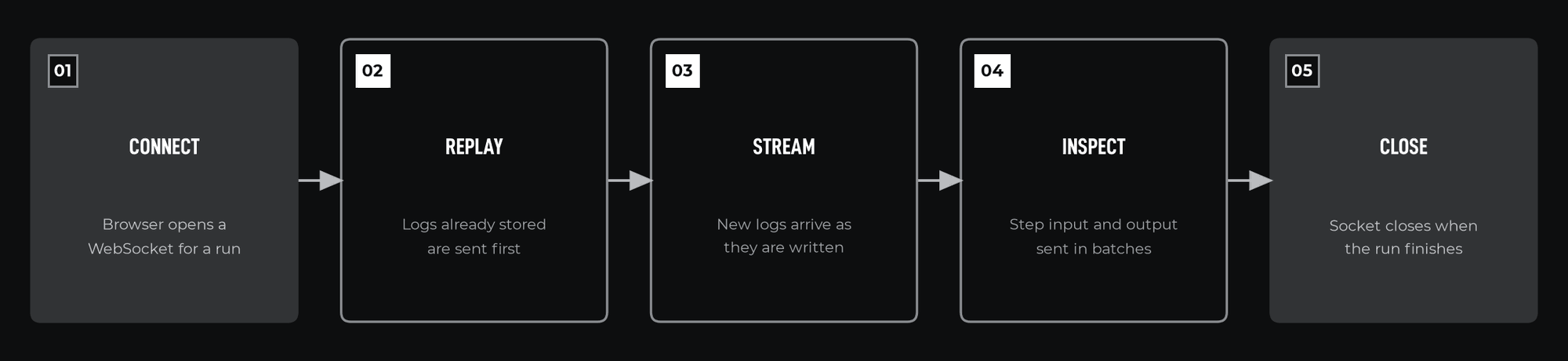
Each log entry has a sequence number within its run. A new viewer receives stored entries up to the current number, then live entries above it, so the two streams meet without gaps or duplicates. The listener subscribes before stored entries are read, and holds an entry until the one before it has arrived.
A shared channel for control
Cancellation requests are published on a Redis channel. The instance holding the run cancels its task, marks the run Cancelled and publishes a confirmation. A request that is not confirmed within a timeout is reported to the user.
Implementation
Run stream
A WebSocket endpoint per run sends stored entries, then live entries, in sequence order, and closes when the run finishes. The listener starts when the first viewer subscribes and stops when the last one leaves.
Step stream
A second endpoint sends a chosen step's input or output, split into size-limited batches.
Cancellation
Each instance keeps a record of the runs it is executing and listens for cancellation only while it has active runs.
Abandoned runs
Each instance sends a heartbeat for its active runs. A sweeper marks a run as failed when its instance stops sending them.
Tools and technologies
| Tool | Purpose |
|---|---|
| PostgreSQL LISTEN and NOTIFY | Log change notifications |
| asyncpg | Native listener connection |
| Redis publish and subscribe | Cancellation requests and confirmations |
| FastAPI WebSockets | Browser streaming |
| Alembic | Trigger migration |
What was delivered
- WebSocket streams
- 2
- Shared cancel channel
- 1
- Replay
- In order
- Listeners
- On demand
- Live, replayable run and step logs in the browser, in order
- Cancellation that works across server instances, with confirmation
- Listeners that run only while someone is watching
- Abandoned runs detected and marked failed
Why it matters
Operating a system includes seeing what it is doing and stopping it when needed. Designing for several instances from the start avoids behaviour that only works on one server.
If your organization is planning a platform of this kind, or needs a specific part of one designed and delivered, we would be glad to discuss it.