

A pipeline engine that runs, pauses and resumes data workflows
The orchestration core of a low-code platform, running visually connected steps in dependency order with breakpoints and resumable runs.
- Partner
- A multinational advisory firm
- Period
- October 2024 to January 2026
- Step types
- 18
- Readers, a transformer, aggregators, LLM analysis, writers and a router
- Ways to run
- 3
- On demand, on a schedule or as a published endpoint
- From saved outputs
- Resume
- Partial re-runs without repeating earlier steps
The challenge
The platform let users connect data steps visually. Something had to run those graphs correctly, with branches and merges, refuse graphs that could never finish, and let users inspect and repeat parts of a run while building it.
What we built
An orchestration engine that orders steps with Kahn's algorithm, rejects graphs with cycles when they are saved, stores every step's input and output with its schema, supports breakpoints, and rebuilds typed data from a previous run to resume without repeating earlier steps.
What was delivered
- Fan-out and fan-in across steps, run in dependency order
- Cycles rejected when a pipeline is saved, with the cycle shown
- Breakpoints, resumable runs and per-step control over logging
Partner background
Our partner is a multinational advisory firm whose teams work with large volumes of documents, spreadsheets, databases and email. It wanted one internal platform where those teams could build data pipelines and AI agents themselves, instead of commissioning a new application for each need. The platform had to run inside the partner's Microsoft 365 and Azure environment, keep each team's work separate, and move work from experiment to production through controlled environments. This case study covers one part of that platform; nine case studies describe the whole.
The challenge
Graphs, not lists
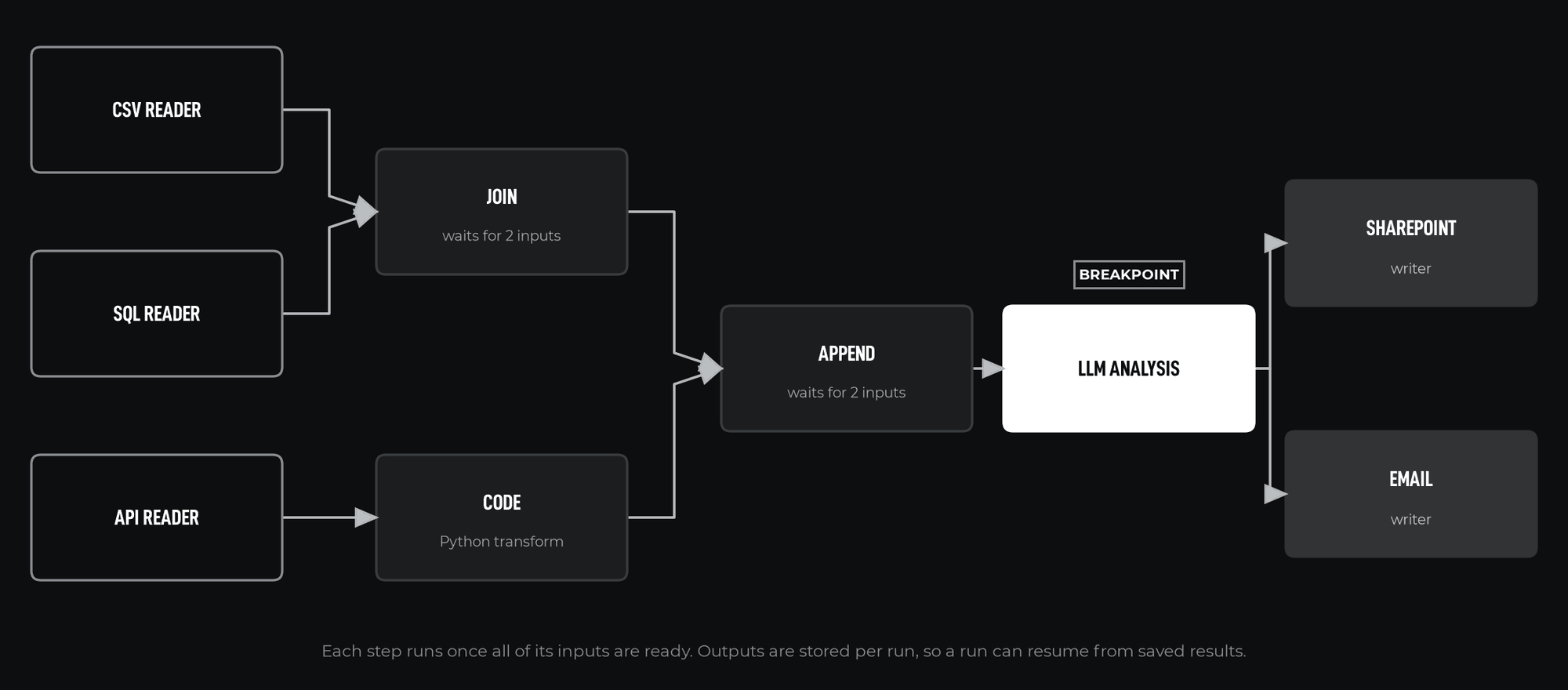
Users connect steps freely. A join waits for two inputs, and one output can feed several writers. Running steps in the order they were drawn would produce wrong results, and a connection drawn back to an earlier step creates a cycle that could never finish.
Building is iterative
While designing a pipeline, users need to stop at a step, inspect the data and change something, without paying for every earlier step again.
Run data grows
Storing every step's input and output for resuming and inspection would grow the database without limit.
Sensitive data in logs
Some steps handle data that should not be stored in run logs.
Objectives
- Run any valid graph of steps in correct dependency order
- Reject graphs that cannot run, before they run
- Support breakpoints for inspection during design
- Resume runs from saved outputs, with stored run data kept bounded
- Control logging of inputs and outputs per step
- Run pipelines on demand, on a schedule or as an endpoint
Our role
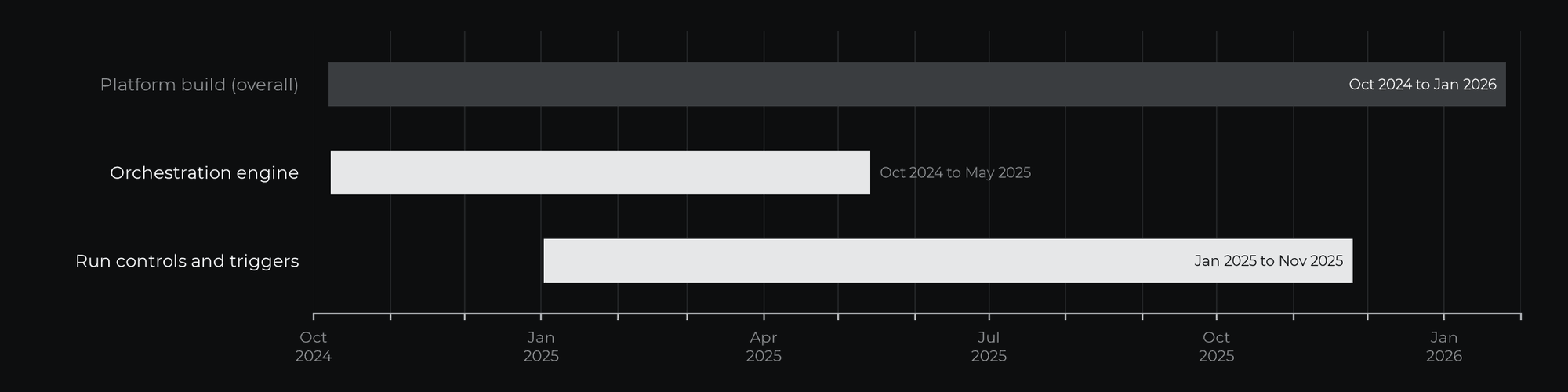
CharCentric provided technical leadership and architecture within a multidisciplinary engineering team, and contributed directly to implementation. The platform was built over 16 months, from October 2024 to January 2026, as a Python and FastAPI backend on Azure.
Scope and timeline
The orchestration engine was built between October 2024 and May 2025. Run controls, triggers and publication were built between January and November 2025.
Approach
Order by dependency
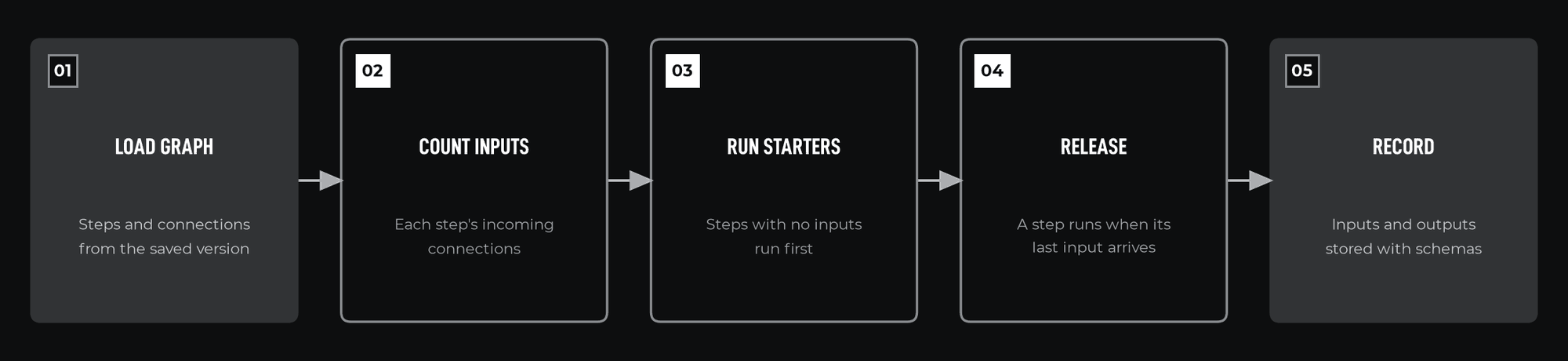
The engine orders steps with Kahn's algorithm: it counts each step's incoming connections, starts the steps with none, and releases each waiting step when its count reaches zero. The same check runs when a pipeline is saved, so a graph with a cycle is rejected, and a depth-first search over the steps left unordered finds the cycle to show the user. Steps on a branch the router does not take are skipped, and their dependents released.
Store data with its shape
Every step output is stored with a JSON Schema of its data. When a run resumes, the engine rebuilds typed models from the stored schema, so resumed steps receive the same data types as in the original run. Outputs above a size threshold are kept in Azure Blob Storage with a pointer in PostgreSQL, and run data is deleted after a retention period.
Build, not buy
The platform's first version, before this build, ran on Prefect. Breakpoints during design, and resuming a run from stored, typed outputs, needed control inside the engine, so an in-house engine replaced it.
One interface for every step
All steps share one interface and are created by a factory. A scaffolding command generates the class, input model, state and registration for a new step.
Implementation
Step library
Eighteen step types: readers for CSV, APIs, SQL databases, documents, text input, RSS feeds, Outlook, SharePoint and web pages; a Python code transformer; join and append aggregators; an LLM analysis step; writers for SQL databases, Outlook, WhatsApp and SharePoint; and a conditional router.
Run controls
Breakpoints stop execution at chosen steps. Input and output logging can be disabled per step. Runs can be cancelled while in progress.
Triggers
Pipelines run on demand, on cron schedules, several per pipeline if needed, or through published endpoints tied to an environment.
Tools and technologies
| Tool | Purpose |
|---|---|
| Python and asyncio | Orchestration engine |
| Pydantic | Typed data between steps |
| PostgreSQL | Run records and step outputs |
| Azure Blob Storage | Large step outputs |
| Redis | Trigger storage |
| FastAPI | Invocation and management endpoints |
What was delivered
- Step types
- 18
- Step categories
- 6
- Run triggers
- 3
- Cycle check
- On save
- An orchestration engine for any acyclic graph of steps
- Cycle detection when a pipeline is saved
- Breakpoints, per-step logging control and cancellation
- Resumable runs with typed data rebuilt from stored schemas
Why it matters
A visual builder is only as reliable as the engine behind it. Getting ordering, typing and resumption right is what lets non-specialists build pipelines with confidence.
If your organization is planning a platform of this kind, or needs a specific part of one designed and delivered, we would be glad to discuss it.